


Key takeaways
- Shoppable video is an effective way to raise AOV without paying for more traffic.
- Shoppers can browse products while the video plays, and add them to cart from the homepage carousel, so there is far less friction between “I like that” and “I’ll take it.”
- Sets, bundles, tagged supporting products and tutorials are the most effective ways to grow basket size.
- Placement matters. Put video where decisions happen, such as product pages and the homepage.
- Pairing video with an AI shopping assistant answers questions about shade, size or suitability without the shopper leaving the page.
- Measure what works. Compare AOV, items per order, add-to-cart rate and attach rate for sessions with and without video.


In retail, you know that increasing average order value (AOV) is one of the most reliable levers for growing revenue without paying for more traffic. The challenge is: how do you get people to spend more?
The answer is to do more with what you already have. Shoppable video is one of the most effective yet underused ways to increase spend. Instead of sending shoppers from a video to a product page and hoping they find their way back, shoppable video lets them browse products while the content is still playing, and add them to cart from the homepage carousel. Done well, it shows customers more of your range, in context, and importantly, at the moment they’re most interested.
What is shoppable video?
Shoppable video is best described as a carousel with conversations. Viewers can tap or click to see product details without leaving the video, and add products to cart from the homepage carousel. It can appear on product pages, landing pages, the homepage and email. Because the shopping happens inside the experience, there’s far less friction between “I like that” and “I’ll take it.”
For more on why shoppable video should be part of your strategy, read Why Shoppable Video Is the Key to Success in the Beauty Industry.
Why it raises AOV
As TikTok clearly demonstrates, video sells. Video does an amazing job of showing how products work together. A static product page sells one item at a time, while a video can show a full routine, application, or recommendations in under a minute. Every product on screen is a potential add-on, and the viewer is already imagining themselves using it.
7 ways to use shoppable video to increase AOV
1. Show products as a set
Build videos around routines and complete looks, such as a cleanser, serum, and moisturizer in one morning skincare routine, with every product tagged. Shoppers who came for one item see the others in use and are more likely to add them.
2. Create bundles from your videos
Pair a video with a ready-made bundle at a small saving. The video makes the case for why the products belong together, and the bundle makes buying them together the easy option.
3. Tag the supporting products
Hero products attract attention, but the accessories, refills, travel sizes, and complementary items are where AOV grows. Make sure everything visible in the frame is tagged, not just the star.
4. Use tutorials and how-tos
Educational content naturally introduces extra products, such as a brush, a primer, or an SPF, because the steps require them. Tagging each one turns a how-to into a basket builder.
5. Place video where decisions happen
Put shoppable video on product pages and the homepage. A short clip showing the product with a complementary item can nudge a shopper at the point they’re deciding what to buy.
6. Use UGC and influencer content
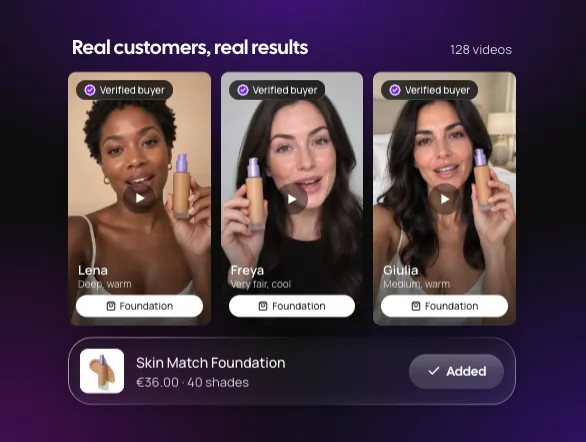
Real people using your products build trust. Tag everything in creator and customer videos so social proof and cross-selling work together.
7. Pair video with a guided shopping experience
Video inspires, but shoppers often still have questions about suitability, size, or shade. Adding an AI shopping assistant lets them ask, get a personal recommendation, and add the suggested products without leaving the page.
Best practices
Here are my recommendations:
- Address common questions
- Include customer testimonials
- Compare products
- Include a clear call to action
- Variety: Produce multiple videos covering different customer questions, needs and product categories.
For example, here’s how I’d approach a skincare product recommendation. Ideal duration: 30 seconds.
- 0–3 seconds: The hook. “Struggling with dry, dehydrated skin?”
- 3–8 seconds: Introduce the product. Show the product and introduce its name.
- 8–18 seconds: Demonstrate the benefits. Explain the key ingredients, benefits, and how to use it.
- 18–25 seconds: Explain who it’s for. “Ideal for anyone looking to improve skin hydration.”
- 25–30 seconds: Call to action. “Discover more and shop it here.”
How to measure success
At Zellor we track AOV for sessions that include shoppable video against those that don’t, along with items per order, add-to-cart rate from video, and attach rate for the secondary products you tag. We look at engagement and trends, video performance and the shopping funnel and compare videos to see which formats, such as routines, tutorials or bundles, produce the biggest basket lifts, then make more of what works.